Monday, December 1, 2014

Apple Pay Competitor 'Android Pay' Is Reportedly Coming To China

It looks as if Apple Pay will soon face some competition in the mobile payments space from its biggest competitor, Android.
According to a new report from China Business News, a new mobile payments service called Android Pay is coming, and it will most likely launch in the third quarter of 2015.
Android Pay is reportedly being developed by China UnionPay, which is the biggest credit- and debit-card provider in China. For context, UnionPay is the second-biggest payment network in the world next to Visa, based on the value of processed transactions.
Because of UnionPay's expansive list of partners, Android Pay could feasibly debut with the support of more partners than Apple Pay, which UnionPay also plans to support next year.
According to Want China Times, UnionPay has already approached smartphone makers including Lenovo and Coolpad. UnionPay is likely to offer subsidies to smartphone makers to ensure popular smartphones will include the technology required for Android Pay to work.
Android Pay will be similar to Apple Pay and will use Near Field Communication payments with Android smartphones, which will allow for wireless payments.


Read more: http://www.businessinsider.com/android-pay-is-coming-to-china-with-unionpay

Saturday, November 29, 2014

Pakistan Smartphone App Success (Groopic)

Lahore, Pakistan (CNN) -- The Pakistani city of Lahore is known as the heritage capital of the country. It's scattered with ancient mosques, majestic 16th century mansions and antique minarets. Lahorites are proud of their cultural legacy.

It's old, it's timeless but it's changing. In the midst of this old city, a vibrant technological revolution is taking place that is buzzing its presence onto the Internet and beyond. Groups of dynamic young tech entrepreneurs are converging on the city to invent mobile apps that can change the way Pakistan can do business with the rest of the world.

Pakistan has 30 million Internet users, that's almost four times the population of New York City. About 15 million Pakistanis are accessing the Internet via their mobile phones opening up a whole new stream of consumer possibilities for savvy business people.

Young entrepreneurs like Ali Rehan, 26, are now exploiting this potential. Rehan and his team at Eyedeus Labs has created"Groopic," a new smartphone app that lets you take a group picture -- and put yourself in it. This way, the photographer will also be included in the picture. It's easy to use and it's making waves in the tech world.

Read More : http://edition.cnn.com/2013/09/18/world/asia/pakistani-apps/


Friday, November 28, 2014

20 Incredibly Useful Free Apps From Microsoft

Microsoft makes a whole lot of money selling software. But it also gives a lot of it away for free.
Here's a collection of useful free Microsoft apps for all sorts of devices — not just Windows PCs, but also Macs, iPhones, and even Android devices.
These apps will help you take photos, share them, give you access to your documents, notes, organize your travel and more.
  1. Photosynth lets you create 3D photographs
  2. ICE (Image Composite Editor) creates panoramic images
  3. Xim is a photo-sharing app for mobile
  4. Skype Qik is sort of like Snapchat
  5. Office Remote lets you control presentations from your phone
  6. SmartGlass lets your phone or tablet interact with your Xbox
  7. Microsoft Health helps track your fitness
  8. HealthVault is an online storage service for medical info
  9. OneNote is a note-taking app
  10. Office Lens makes your mobile device into a scanner
  11. Remote Desktop lets you tap into another PC from far away
  12. Torque puts Bing on Android Wear devices
  13. Next Lock Screen puts Office info onto your Android lock screen
  14. MSN Travel lets you plan and book travel from your phone
  15. MSN Food & Drink has a ton of recipes
  16. Sway is like an updated version of PowerPoint
  17. OneDrive, once a storage service, now includes a free online version of Office
  18. Templates for Office Online help you create things
  19. Docs for Facebook is Office as a Facebook app
  20. Office 365 Nonprofits gives Office away for free to nonprofits


Read more: 
http://www.businessinsider.com/incredibly-useful-free-microsoft-apps-2014-11?op=1


Thursday, November 27, 2014

You can now check which devices are logged into your Google account

Google has launched a new security feature for its users Monday: A Devices and Activity dashboard, letting you know which devices are accessing your Google account.
The dashboard, available here, shows you a list of all devices active on your account in the last 28 days, as well as the location they're in.
google devices
A new Google dashboard lets you check which devices are currently signed into your Google account.
If you see any suspicious activity, a link on top lets you quickly set up your security settings, including changing your password as well as recovery and 2-step verification settings.
That wizard, aimed primarily at administrators but accessible to all Google users, can be accessed directly at g.co/accountcheckup.
Have something to add to this story? Share it in the comments.

Wednesday, November 26, 2014

Dropbox’s Mobile Apps Are Now Integrated With Microsoft Office

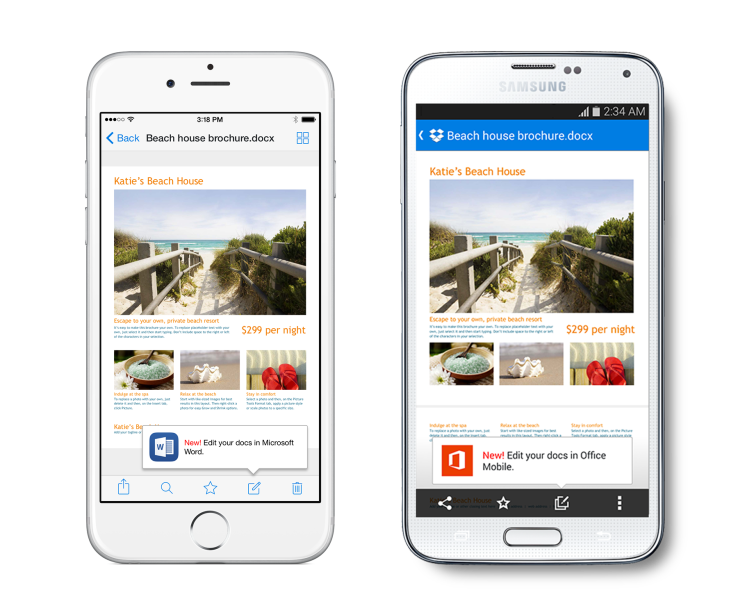
Earlier this month, Dropbox and Microsoft announced a partnership that would see Dropbox offer better support for Microsoft’s Office Suite, including the ability to edit Office docs from the Dropbox mobile app among other things. Today, those integrations have gone live for users of both the Android phone and iOS Dropbox applications.
Explains Dropbox in a blog post announcing the news, users can now edit their Office files when they’re “on the go,” editing them directly from the Dropbox app and accessing the files directly from the Office apps. To use the new feature, you’ll first need update your app to the latest version, then open any Office document, spreadsheet or presentation that’s stored in your Dropbox.
From here, a new “Edit” icon (see above picture) will be available that will allow you to switch over to the new mobile Office apps to make changes to the file. When you’re finished working, those changes will be saved back to Dropbox automatically.